Introduction to Meerkat in the Context of CAD and DWG Libraries
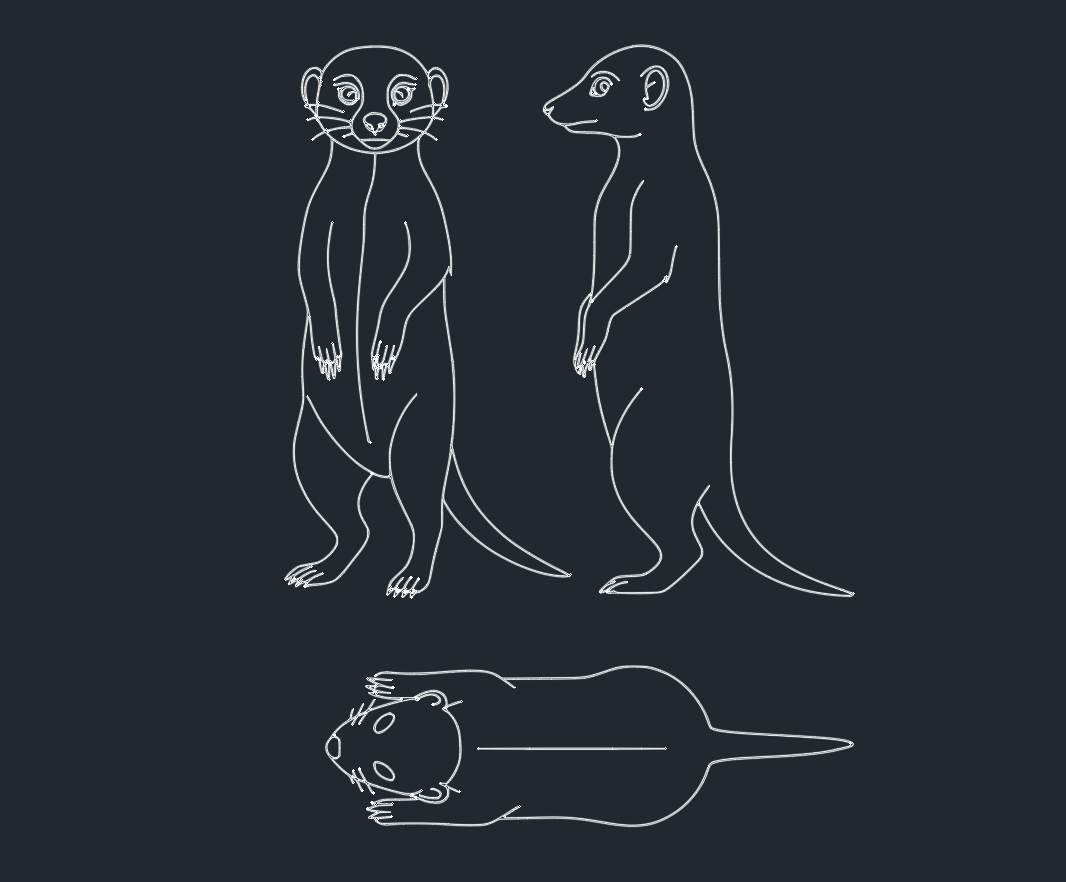
In the world of CAD design and DWG libraries, precision and detail are paramount. Incorporating animal models, such as the meerkat, into architectural visualizations, landscape plans, and environmental simulations can elevate the realism and storytelling potential of your projects. This micro post explores the technical aspects, applications, and benefits of integrating a meerkat DWG block or 3D model into your CAD workflow.
The Significance of Meerkat Models for Engineers and Designers
Meerkats, with their distinctive upright posture and social behavior, are often used in architectural and landscape renderings to convey scale, life, and context. Accurate meerkat DWG blocks allow engineers and CAD designers to:
– Enhance public park and zoo visualizations
– Add life to environmental and wildlife simulations
– Support educational and interpretive signage designs
– Improve the realism of themed environments and exhibits
Leveraging a high-quality meerkat model within your CAD library streamlines the design process and ensures consistency across projects.
Technical Specifications: Meerkat DWG Files
When selecting a meerkat DWG block or 3D model, consider the following technical requirements to ensure compatibility and optimal performance within your CAD platform:
1. Format and Compatibility
– File Format: DWG (AutoCAD Drawing), compatible with AutoCAD, BricsCAD, DraftSight, and other leading CAD software.
– Version: Ensure the meerkat DWG block is saved in a version compatible with your CAD toolset (e.g., AutoCAD 2013–2024).
2. Model Details
– 2D Availability: Choose between 2D symbol blocks for plan and section views, or detailed 3D models for realistic renderings and walkthroughs.
– Polygons and File Size: Opt for low-poly models for fast rendering, or high-resolution meshes for photorealistic outputs.
– Layer Organization: Models should be organized by layers (e.g., body, fur, eyes) for easy customization and efficient editing.
3. Realism and Scale
– True-to-life Dimensions: Ensure the meerkat model reflects accurate anatomical proportions (average adult size: 25–35 cm in length).
Applications of Meerkat DWG Blocks in CAD Projects
Architectural Visualization
Meerkat DWG blocks are ideal for populating park, zoo, or safari lodge renderings. Their inclusion helps stakeholders visualize visitor experiences and adds a dynamic, engaging element to presentations.
Landscape Design and Site Planning
Engineers and landscape architects use meerkat models to illustrate biodiversity and habitat considerations in site plans, thereby supporting environmental impact assessments and public outreach.
Educational and Interpretive Projects
Accurate meerkat representations are essential for museums, nature centers, and interpretive signage, where clarity and realism support educational objectives.
Downloading and Integrating Meerkat Models
Many reputable DWG libraries offer free or premium meerkat DWG blocks for immediate download. To integrate a meerkat model into your project:
1. Download the DWG file from a trusted library.
2. Open your CAD software and import the meerkat block into your drawing.
3. Adjust the scale, rotation, and placement as needed.
4. Assign the meerkat block to appropriate layers for visibility control.
5. Save your project with the referenced meerkat model for future use.
Best Practices for Using Animal DWG Blocks
– Maintain File Organization: Keep animal blocks in a dedicated library folder for easy access.
– Optimize for Performance: Use low-poly or simplified blocks for large projects to ensure smooth navigation and rendering.
– Attribute Data: Where possible, attach metadata to the meerkat block (species, scale, designer) for improved asset management.
Conclusion
A well-crafted meerkat DWG block is a valuable addition to any engineer’s or CAD designer’s library. By choosing accurate, detailed, and well-organized meerkat models, you enhance the realism, educational value, and visual appeal of your CAD projects. Whether for architectural visualization, landscape design, or educational exhibits, integrating animal models like the meerkat supports effective communication and project success.
For the best results, always source your meerkat DWG files from reputable libraries and ensure compatibility with your CAD software. Explore the possibilities and elevate your design presentations with meticulously crafted meerkat models today.
Leave a Reply
You must be logged in to post a comment.